Thursday, March 21, 2013

Introduction to Color Theory


Students,
Your next assignment is to create a color theory page that shows some color harmony palletes and a short writing assignment.
Part 1 - Color Page:
  • Create a new HTML Page, format it with CSS to match your portfolio page and label it "colortheory.html"
  • Make a link on your Web Portfolio to this new page
  • Create 2 boxes with the Div tag and make them 50X50 pixels. show 2 complementary colors in these boxes and label them Complementary
  • Create 3 boxes with the Div tag and make them 50X50 pixels. show 3 split-complementary colors in these boxes and label them split-complementary
  • Create 3 boxes with the Div tag and make them 50X50 pixels. show 3 analagous colors in these boxes and label them analagous
  • Create 4 boxes with the Div tag and make them 50X50 pixels. show 4 quadrilateral colors in these boxes and label them quadrilateral
Part 2 - Short Writing Assignment:
On your Color Theory page, write a short summary of the principals discussed, shown and demonstrated in this color theory lesson. Refer to your lecture notes. You can search for images online and research answers also. Try to address all the questions listed below:
  1. What are the 3 primary colors? 
  2. How are secondary colors created? Cite an example 
  3. How are tertiary colors created? Cite an example 
  4. What is the difference between subtractive and additive color models? 
  5. How can color affect our perception? 
  6. How does one color affect another? 
  7. Find an example or show an example of a greyscale image. 
  8. Find an example or show an example of a monotone image. 
  9. Find an example or show an example of an image that uses complimentary color.
  10. Make sure your images are small, no more than 100 pixels wide and are compressed properly.


- Mr.W

Tuesday, March 19, 2013

Long Term Project: Print Portfolio Development


Hello Students,
Having a polished and professional looking portfolio is key to your success in finding work after High School and moving on to developing a career. Download the ROP Portfolio Handbook to use as a guide for creating your own portfolio.

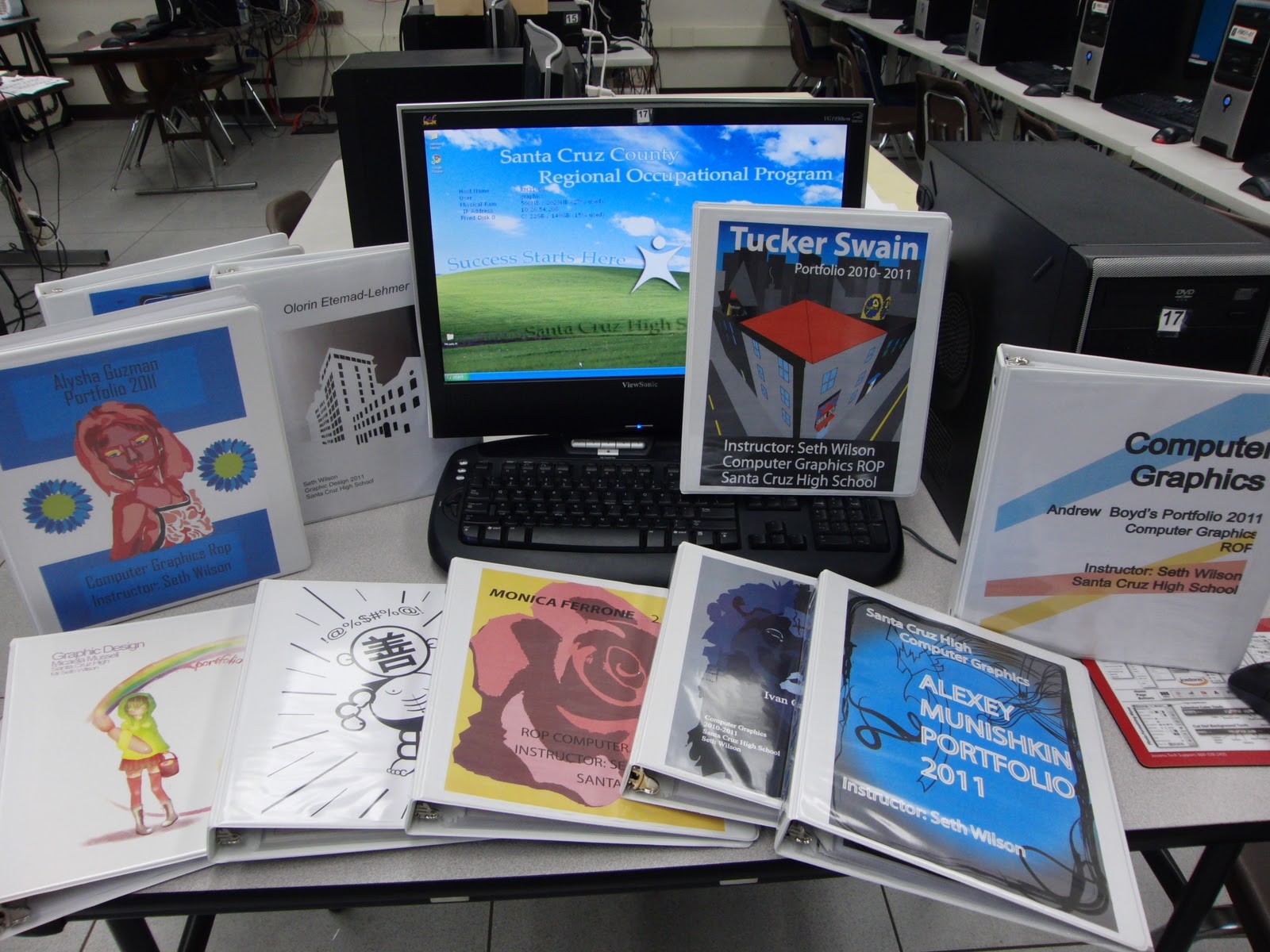
Examples of student portfolio's from a computer graphics course.

Remember that the best portfolio in class will be sent to the portfolio design competition that ROP has at the end of each school year, your portfolio will compete against other classes across the county and there certificates for finalists and a prize for the winner.

A judge evaluates print portfolio's from past entrants...

Portfolio Development Assignment:
  • Your portfolio can be created with microsoft word or with Indesign
  • The final file you turn in to me must be a PDF document
  • Portfolio must meet the requirements in the ROP Portfolio Handbook
  • Your portfolio cover, table of contents and all materials should look clean and consistent. Use consistent design style across all aspects of your portfolio. The more extensive your portfolio is the better, that includes writing about your projects to document your learning progres

Your Portfolio must contain in this order:
  • Cover page with your name, class title, year. Spend some time on this, it should show good design skill and be reflective of your personality
  • Table of contents
  • Letter of Introduction
  • Resume
  • Handwritten Job Application 
  • List of References
  • Letter of Recommendation -  cannot be from your ROP teacher or a family member
  • 3 or more work samples with written explanation about the work, why is it important to your career choice? What did the project entail, what were the challenges and difficulties? Give us details. 
  • You are responsible for printing and binding your portfolio
  • Sky is the limit, you can add your own style to the entire portfolio
How Your Portfolio Is Evaluated:
  • Contains required content and format
  • Well organized
  • Free of grammar errors
  • ROP related work samples
  • Shows creativity
  • Shows skill development
  • Appropriate for use in job search
  • Professional yet creative appearance

Use this as a rough guide to laying out your own portfolio...
Ok have fun!

- Mr.W

How To Write A Good Great List Of References


Students,

It is incredibly important to develop a great list of references. These references will help you obtain jobs, college admission or acceptance into special programs.

Who makes a good reference?

  • Teacher
  • Coach
  • Counseler
  • Present or past employer
  • Family friend
  • Anyone that can speak highly of your abilities, skills and worth


References to avoid:

  • Anyone under 18
  • Personal friends
  • family members
  • Anyone who cannot speak highly of your abilities or skills

Important Tips:
The format of your references should match your resume exactly, same header, same fonts.
Do not include references on your resume
Include at least three references
All references should be responsible adults who know you well and can speak to your character and skills
Always ask whether or not someone is willing to be a reference before including them in your list
Verify the contact information before handing over to an employer

Format:
Use the following format for your references

Persons Name:   Bob Smith
Address:            123 Fake Street
                          Santa Cruz Ca, 95060
Phone #:             (831) 555-4321
Title and              Business Owner
work place:         Moland Spring Bottled Water

- Mr.W

Monday, March 18, 2013

How To Write A Good Great Resume


Hello Students,
Having a solid resume is the cornerstone to your job future. A well written and well designed resume is what sets you apart from other job applicants. A perfectly written job application, a quality resume and a list of positive references is the job seekers trifecta. In this class we will teach you these skills and more. Below is a list of writing tips, read over it before finalizing your resume.

Link, right click to download: ROP PORTFOLIO HANDBOOK

Resume Writing Tips:
Have an objective:
Know the purpose of your resume and edit it for different job scenarios. Having a focused job objective listed on your resume will help you with attaining an interview and getting hired.

Back up your special skills with job experience:
List your skills but make sure your listed job experience, training or education reflects those skills. Are you really good at making websites? Let them know how and where you learned that skill.

Research and use the right keywords:
Every industry has its own language, research job offerings and pay attention to the keywords that are used. If you put your resume online with a job placement service they will often use certain keywords to search their database for potential hires.

Be descriptive with job experience:
A job title will communicate your role, but not the details of your work experience. List the duties, tasks, activities, skills and achievements that were part of your job.

Format your text:
Use bold text to start each section. Use bullets for lists. Make the document easy to quickly scan and read. Clarity of format is crucial, you have ten seconds before the employer will move on to another applicant.

List most recent job experience first:
This also goes for education, list the most recent first. If your still in High School you can say "future class of 2012", or "Currently attending HS".

List most important skills first:
When writing out your skill list make the most important skills the first ones on the list. If you are applying for a web design job, list your web skills first. Change and edit this for different industries/jobs.

Leave out the obvious:
It is not necessary to add "available for interview" or "references available upon request". References are standard and expected, and of course you are available for an interview. Thats the whole point!

Avoid negativity:
Don't trash talk past employers or state that you didn't like a past job. Simply state that you were looking for future opportunities.

Go with what you got:
If you haven't had work experience yet, just list any summer jobs, volunteer experience etc. If you have hobbies that are relevant to the job you can list those. If you don't have a diploma or degree then just list your estimated date for completion.

Proofread your resume:
Have your neighbor or classmate read your resume. Sometimes the spellchecker doesn't catch typos. The more eyeballs that see your resume before it gets in the hands of the employer the better.

Although these resumes contain similar information, styles do vary.


- Mr.W

Wednesday, March 6, 2013

Code Academy: Web Fundamentals

Students, your newest assignment is to work through the web fundamentals section on code academy. This will reinforce your new code skills and should be much easier for you now that we have a good working knowledge of html. When we complete the web fundamentals we will move on to other units. Watch your achievements grow and track your own progress, code academy makes learning programming languages fun and interactive.

Code Academy Part 1, HTML  and CSS:

  • Log onto codeacademy.com and create an account
  • Edit your profile
  • Begin the "HTML Basics" coding exercises
  • Complete all units in the HTML Basics lessons

Code Academy is a great free resource for learning to program in different languages.

Sunday, March 3, 2013

Understanding Computer Memory

Hello Students,
Use your notes from todays lecture and create a new page that is linked from your portfolio page.

Understanding Computer Memory Assignment:
  1. Create a new, properly formatted HTML file, save it in your portfolio folder, format it with your css file 
  2. Write 2 paragraphs answering these questions: 
    1. With all the electronic devices you own estimate how much memory they store. 
    2. How many floppy drives would you have to carry to equal the memory you have access too with your personal electronics? 
    3. How much internet traffic occurs in one day? 
  3. Add your notes from today’s lecture 
  4. Save and create a link to this file on your portfolio page
Have fun! - Mr.W

Monday, February 25, 2013

Understanding File Formats: Format Evaluation Exercise

Hello Students,
In this exercise you will practice using the "save for web & devices" feature in Photoshop, a media industry standard when creating compressed images. Creating images that have visual clarity and small file size is extremely important in optimizing a website for viewing online.

File Format Exercise
  • Download and 0pen the image of trees posted below in Adobe Photoshop
  • Go to File / Save for Web & Devices
  • Photoshop has 12 presets, save 1 example of each. Use self-descriptive file names and save them in your portfolio folder inside a new folder labeled "images"
  • Create a new document in Photoshop that is 200X200 pixels, fill the image with a gradient, create a circular selection and create a new layer and fill the circular selection with another gradient, the colors can be your choice. Red is the hardest color to compress, it will show the most artifacts from compression.
  • Go to File / Save for Web & Devices
  • Photoshop has 12 presets, save 1 example of each. Use self-descriptive file names and save them in your portfolio folder inside a new folder labeled "images"
  • Compare the results
  • Create a new HTML file in your portfolio directory. Your HTML file must be UTF-8 and be properly formatted for validation, it can use the same CSS file that your portfolio page does. 
  • Choose the images that have the smallest file size, the best image quality and the best balance of file size and image quality. Embed these images on your file format HTML page.
  • Create a link to your new file format HTML page in your Portfolio Page.
Images that have large flat areas of color such as
blue sky can show compression artifacts
Your gradient test image should look like this