Monday, January 23, 2017

The Internet and Using Search Engines

Todays Agenda:
  • Lecture: The Internet
  • Search Engine Exercise


Search Engine Exercise:
Search engines allow you to search a database of web sites and files. Google and Bing allow you to search a directory of sites that have been registered by the site owners, for example yahoo. a Meta-search engine searchers other search engines, for example ixquick.

A good searching strategy is the key to finding the information you need:

Searching Tips:
  • Become familiar with more than one search engine, understand that different engines compile data differently. For example, google's boolean search technique is based upon popularity, but not always relevance
  • Be as specific as possible in your search terms. Use unique words or phrases
  • Use a niche site for your search, for instance amazon, or wikipedia
  • Use boolean operators in a meaningful manner (and, or, not)
  • Pay attention to publishing dates, file sources. Not everything on the internet is true
  • Don't give up easily, adjust your search terms. Experiment to find your results
  • BE A NINJA. Try using the Advanced Google Search
  • BE A SUPER NINJA. Try writing Advanced Google Search terms as code right in the browser!

Search Engine Ninja Exercise:
Research the questions below using a search engine or engines. Use advanced search techniques or specific sites to discover your answers. Compile the answers to all 10 questions and email them to me at sethwilson@sccs.santacruz.k12.ca.us

1. What does CSS and HTML stand for?
2. Who invented the worlds first Digital Camera?
3. What is the highest recorded temperature for Death Valley?
4. What is the HTML Tag that defines Emphasized Text?
5. How many Gigabytes in a Petabyte?
6. Who sent the worlds first Email?
7. What is the EFF and what do they do?
8. Who is Tycho Brahe and what part of his body was replaced with silver?
9. Who invented the font "Helvetica" and what is the meaning of its name?
10. What do the letters in HTTP and FTP stand for?

Compile your answers and email them to me. Make sure you include your name and title of this exercise in the subject of your email.

Monday, August 1, 2016

Thank you to all my great students from this years ROP Web Design class. There were some very impressive projects this year and I look forward to seeing a few of you in my classes next semester.


This blog will go live again for the spring semester 2018 ROP Web Design class.

- Mr.W

Tuesday, May 17, 2016

Explore Programming Languages with Code Academy

Hello Students,
In this modern tech industry having a well rounded skill set in web design and programming languages is incredibly important to staying in demand. HTML and CSS are just the first components to creating websites that are compelling, interactive and intuitive. In this project you will explore other languages, complete 3 programming goals and complete one entire lesson in the language of your choice.

A gifted mathematician, Ada Lovelace is considered to have written instructions for the first computer program in the mid-1800s
Web Programming Language Exploration Project:
  • Log into Code Academy and find the language skills section
  • Complete the "Introduction to Javascript" and "Choose your own Adventure" modules
  • Complete the "Introducing JQuery" module
  • Complete the "Introduction to PHP" module
  • Complete the "Python Syntax" and "Tip Calculator" modules
  • Complete the "Introduction to Ruby" and "Putting the Form in Formatter" modules
When you have completed these modules, navigate to the GOALS section and complete these 3 modules:
  • Animate Your Name
  • About You
  • Sun, Earth and Code
When you have completed the GOALS modules, you must choose on of the languages and complete its entire module, Javascript, JQuery, PHP, Python or Ruby.


Have fun! All progress should be complete by the 9th!

- Mr.W

Tuesday, May 10, 2016

Web Development Group Project Phase 3

Hello Students,
For our next phase we begin laying out the structure of our websites. Use the flowchart below as a rough guide for the layout and arrangement of our elements. Use place holder information and images for now until we have all the content available.

Flow Chart for Website Development:
- Mr.W

Sunday, May 8, 2016

Web Development Group Project Part 2

Hello Students,
For the 2nd day of our group project, the teams must propose and agree upon a unified platform for the development of our websites. Each team must take a turn proposing a platform or approach and argue why. Teams must vote and choose a platform democratically. Other deliverables are to be achieved today as listed below.


Step 1 - Choose A Platform:
Each team should meet to discuss before proposing their platform of choice.
  • Each team gets a turn proposing a platform for development, platform must be mobile ready, easy to use, stable and appropriate for our small scale web site, boostrap, foundation, w3c.css are to be considered
  • Teams must vote, each team member gets 1 vote, tally votes on whiteboard
  • Upon vote completion, teams focus on next phase
Step 2 - Choose A School:
We will develop sites for Santa Cruz HS, Harbor HS and Soquel HS. Teams may randomly assign schools to teams with numbers in a hat method. Alternatively, teams can nominate themselves for a school with approval from team members

Step 3 - Identify Key Resources:
Team leads should research templates for our sites, team members should identify the information and assets listed below. Focus on meeting deliverables listed:


  • Team Leads:
    • Identify a simple, straightforward and easily modifiable template for site development, propose and explore options
    • Alternatively, explore development of an original layout/design 
    • Decide on a path by end of day

  • Team Members:
    • Identify these resources and assets needed for your school website:
      • School colors in Hexcode
      • School colors in RGB values
      • Find/Download School Logos in high resolution/good quality 


Thursday, May 5, 2016

Web Development Group Project Part 1

Hello Students,
Today you will begin our first team based web development project. Follow the steps below to build your teams and complete all documentation requested. Teams should be assembled, well defined and ready to begin development on Monday morning. Follow the Steps below carefully...


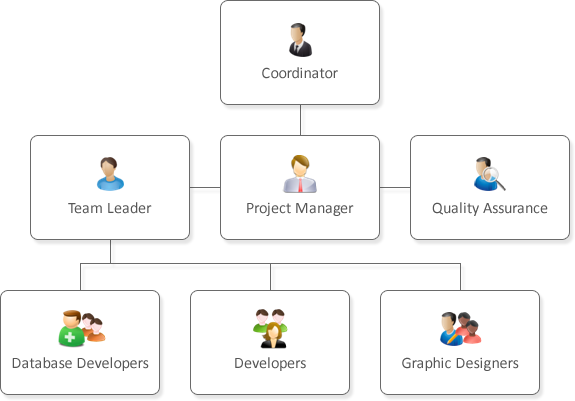
Here is the hierarchy for our groups:

  • Project Manager (your instructor)
    • Team Leads
      • Team Members with defined roles


Web Development Group Project Step 1: Choose Team Leaders

  1. Each student should nominate 3 people to be team leads
  2. Nominations should be based on not just proficiency but leadership and organizational skill
  3. Take nominations by ballot, tally nominations and announce the top 3
Web Development Group Project: Building Teams
  • To determine teams, have each remaining student identify their skill strengths in these following areas on a scale from 1-5:
    • Coding HTML5/CSS
    • Graphics, including Graphic Design
    • Problem Solving, Researching, Testing and Debugging
  • Compare scores and designate groups so each team has an evenly balanced set of skills in those 3 categories, or as close as possible
  • Teams should assemble and choose 1 row in the computer lab to sit together. Please migrate files as needed with USB drives.
Deliverable - Write a Team Bio/Dossier:
Teams should agree on the team titles/names democratically. Follow Roberts Rules of Order to nominate, vote in case of dispute. The format of this dossier can be any type, word document, google doc, pdf file, html page, etc....
  • Each team should write a short dossier with the following details:
    • Team Name (this is a code name for classroom use only)
    • Team Lead
      • Name
      • Codename
      • Age
      • List 3 skills you bring to the group related to web development
      • Define your roll on the team and how you can support in best, in what areas?
      • Describe your ideal donut in 12 words or less
    • Team Members:
      • Name
      • Codename
      • Age
      • List 3 skills you bring to the group related to web development
      • Define your roll on the team and how you can support in best, in what areas?
      • Show an example of 1 dog that looks like a celebrity (no duplicates!)
Dossier's are due on monday,

Have fun!
- Mr.W

Thursday, April 21, 2016

Career Research and Writing Assignment

Hello Students,
As part of your career development module, we will research 1 possible career you are interested in and write a short essay about the career, citing details, salary and pathway to this career. This writing assignment can then be included in your portfolio's career development section...

What interests you as a career? Pick one to research for this assignment

Job Research and Writing Assignment:
Search for a job title, something your would be interested in. Research 3 jobs and write about why you would be interested in that job. Be thorough!  Tell me information about the job such as:
  1. Job Title
  2. Job Description
  3. Job Activities
  4. Education Needed
  5. Career Pathway
  6. Salary Range
Assignment Specifications:

  • Complete assignment in essay form
  • 3-4 Paragraphs with details
  • 150 Words minimum

Example Essay:


Career Research Essay By: Kel Varnson
Subject: Computer Programmers

General Description:

Computer programmers write instructions that tell computers to perform a variety of different tasks. They may write programs that will perform accounting or billing functions. Other programs may operate robots or computer-aided design (CAD) machine tool operations. Some programs allow people to create artwork or graphics, while others coordinate space flight operations.

Programmers speak with the individuals or groups that need programs in order to understand their needs. They then outline the steps the computer must go through to get the job done. It is the programmer's job to identify all of the steps the computer complete to produce the desired results.

Programmers use computer languages to write programs. Some languages operate the computers while others are used to write programs that perform tasks. Higher level languages require less technical understanding of how computers operate. They are said to be more friendly. They are easier to use and may accomplish a complicated task with a single command. A less friendly, more basic program will require more detailed instructions. Programmers determine the appropriate language to use, based on the advantages and limitations of each.

When programs are finished, the programmers must test or debug it to be sure that errors and problems have been found and corrected. Also, the programmers write two sets of instructions for individuals who will use the program. The first is for other programmers who will work on the program in the future. Another set of instructions is written for program users.

This is a Hot Occupation. Over the next 10 years, job openings in this occupation are projected to increase by at least 27%.
  • Write programs that tell a computer what to do
  • Usually know more than one programming language
  • Spend working hours alone, but often work in teams
  • May have flexible schedules, including telecommuting
  • Often work long hours
  • Have at least a bachelor's degree
  • Earn $61,730 per year (national average)
  • Stay up to date on new programming languages
Hours & Conditions:
Computer programmers usually work in well-lit, climate-controlled offices because computers do not function well in environments with extreme temperature or humidity fluctuations.
Work Locations:
Computer programmers work at universities, government agencies, and business firms.

Pros & Cons:
Programmers like working with computers and planning ways to solve problems. They find their jobs to be challenging. They like working indoors in clean, air-conditioned offices. Also, there are many opportunities for employment in this field.